For the networks you answer for
Technicians, consultants, MSPs and admins — a client site, a branch office, a rack you inherited. Anywhere you administer the network and have to know what is on it and what it exposes.
NetRecon is a mobile app for IT professionals. It discovers the devices on the private network your phone is connected to, works out what they are, and tells you which of them are quietly exposing something they shouldn't. Results stay on your device.
NetRecon is a defensive LAN scanner and network auditing app for mobile, written for the people who are responsible for the network. It sweeps the private subnets your phone is attached to, identifies what it finds, and turns that into a plain list of problems with a fix next to each one.
Technicians, consultants, MSPs and admins — a client site, a branch office, a rack you inherited. Anywhere you administer the network and have to know what is on it and what it exposes.
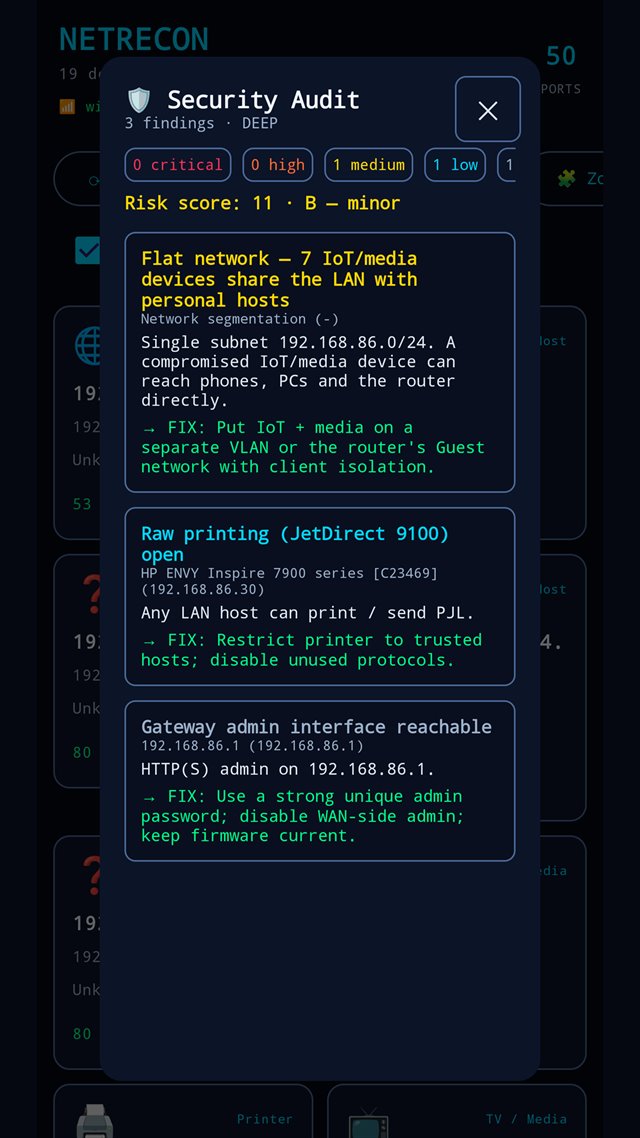
Every finding carries a severity, the evidence that produced it, and the remediation step — not a raw port dump you have to interpret yourself.
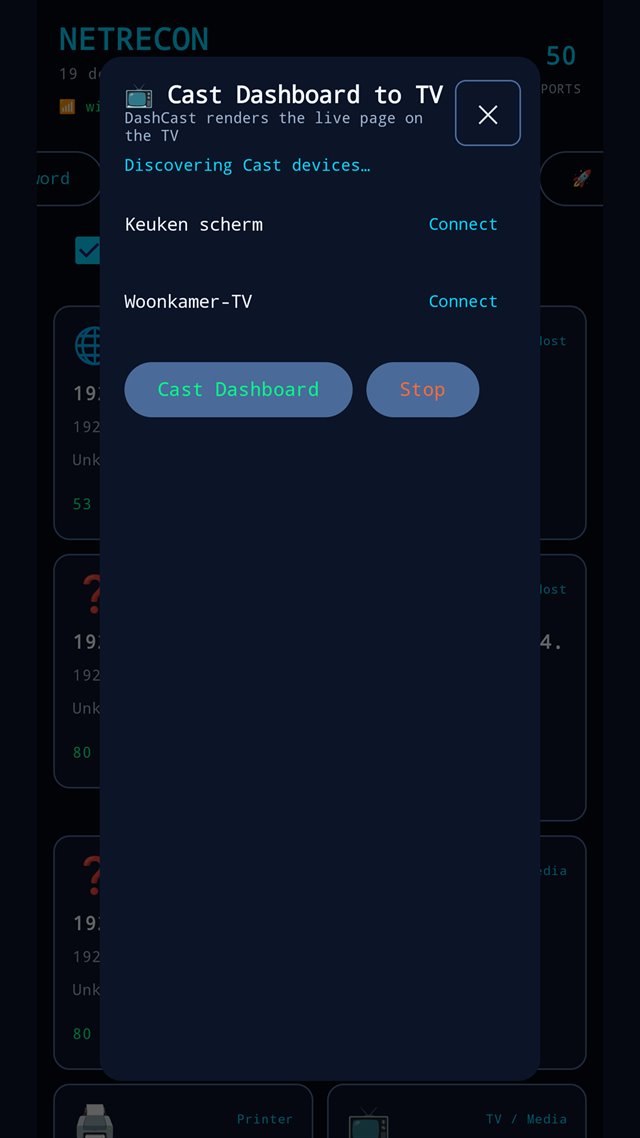
Push the live dashboard to a Chromecast-compatible TV so you can walk a client or a colleague through the whole network in the room, not off the phone in your hand.
Scanning is limited to the private subnets the host is attached to. NetRecon does not scan the internet and does not accept an arbitrary target — outbound actions are restricted to private LAN addresses.
Discovery and auditing are passive observation, with one deliberate exception. Almost everything NetRecon does is reading: TCP-connect sweeps, service banners and the names devices advertise over mDNS/Bonjour. On Android that also covers ping sweeps, the ARP table, SSDP/SNMP/NetBIOS and TLS protocol versions, and it reads UPnP port-mapping tables without ever writing them.
The exception is the default-credential probe, and it performs real HTTP-Basic login attempts against devices that ask for HTTP-Basic authentication. It is opt-in and off by default, capped at 3 attempts per host so it cannot walk a device's lockout counter, and it refuses to send credentials over TLS it could not verify — on an unverifiable HTTPS endpoint it reports that the check was declined rather than leaking a password to whatever answered. Only turn it on against devices you are authorised to test. The same rules and the same caps apply on both platforms.
Background monitoring is an interval, not a schedule. The re-scan interval you set is a floor. The operating system decides when a background task actually runs and can delay it, so NetRecon never promises a scan every N minutes. Monitoring also only runs while the phone is on a private network — drop to cellular and nothing sweeps.
Scan results stay on your device. NetRecon has no backend of ours. See the NetRecon privacy policy for the full detail, including the third-party services involved.
The five sections below describe the Android app, which is the complete feature set. The iOS app is a subset of it and is not released yet — Availability sets out what iOS does, what it does not, and what it never will.
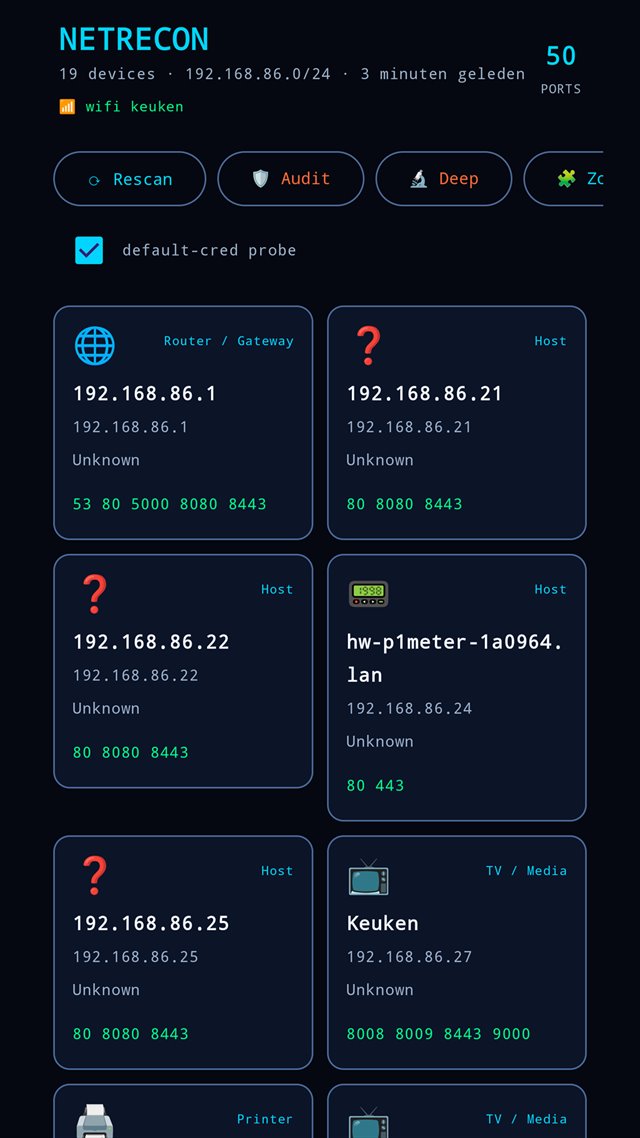
A sweep of the local subnets, then enrichment from every source a device volunteers about itself — so the list reads as device names, not as addresses.
ping · latency · Wake-on-LAN · copy IPThe security audit turns a scan into a severity-ranked list of findings — critical, high, medium, low, info — each with the evidence behind it and the change that fixes it.
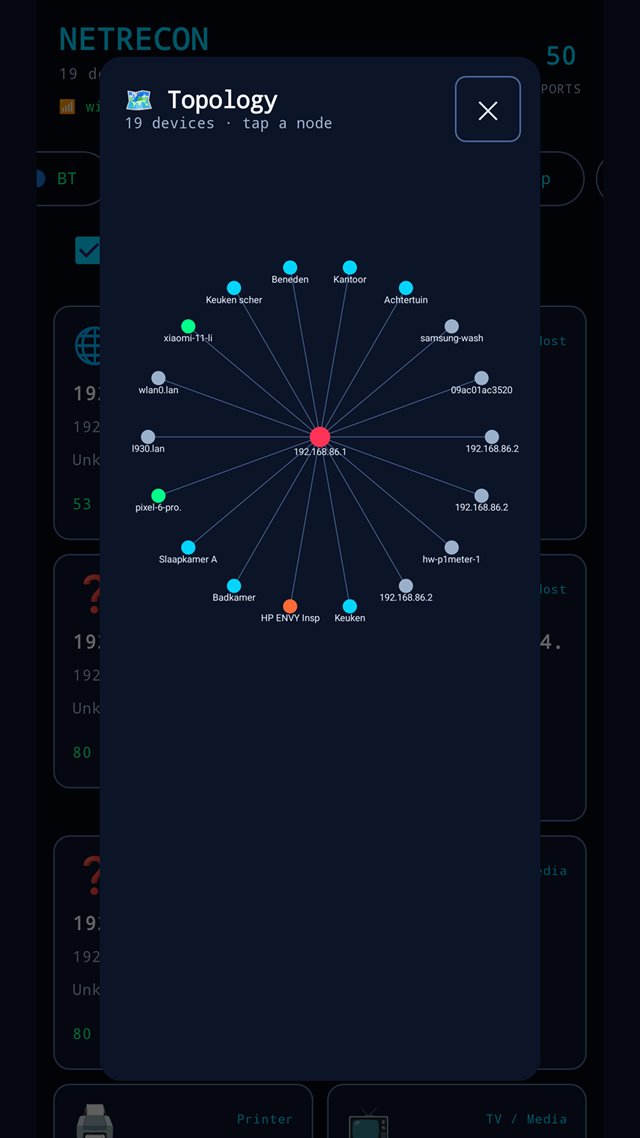
One scan is a snapshot. The value is in noticing the arrival — a device that wasn't on your network yesterday and that nobody remembers plugging in.
Your phone serves the dashboard itself. A small HTTP server inside the app renders the current scan as a TV-friendly page, and Google Cast throws that page onto a Chromecast-compatible screen.
When the audit is done, export it. A single self-contained HTML report of the scan and its findings, shareable through the normal system share sheet.
Discovery is free forever, ad-supported, and capped at the first five devices. NetRecon Pro removes the ads, lifts the caps, and unlocks the auditing and reporting surface.
Scan, discover and fingerprint your network, check a password against known breaches, cast to the TV, and measure your line. Device cards and secondary lists show the first five entries.
Every device, no caps. The full security audit, deep audit, trust-zone analysis, Wi-Fi security and heatmap tools, HTML report export, and direct web/FTP/SSH access into a device. No ads anywhere, including at launch.
| Capability | Free | Pro |
|---|---|---|
| Discovery | ||
| Network scan & device discoveryPing / TCP sweep, ARP, mDNS, SSDP | ✓ | ✓ |
| Devices shownBeyond the cap, cards are locked behind the paywall | first 5 | unlimited |
| Vendor lookup, categorisation & fingerprinting | ✓ | ✓ |
| Read-only probesUPnP, SNMP, NetBIOS, ping, latency, Wake-on-LAN | ✓ | ✓ |
| Custom device names & notes | ✓ | ✓ |
| Topology mapThe gateway hub is always drawn | first 5 nodes | all nodes |
| Auditing & hardening | ||
| Security auditPlaintext services, TLS, UPnP exposure, and the rest | — | ✓ |
| Deep auditSlower, more thorough network checks | — | ✓ |
| Trust-zone / segmentation analysis | — | ✓ |
| Opt-in default-credential probeRuns as part of the audit; off by default either way | — | ✓ |
| Password / breach check (HIBP) | ✓ | ✓ |
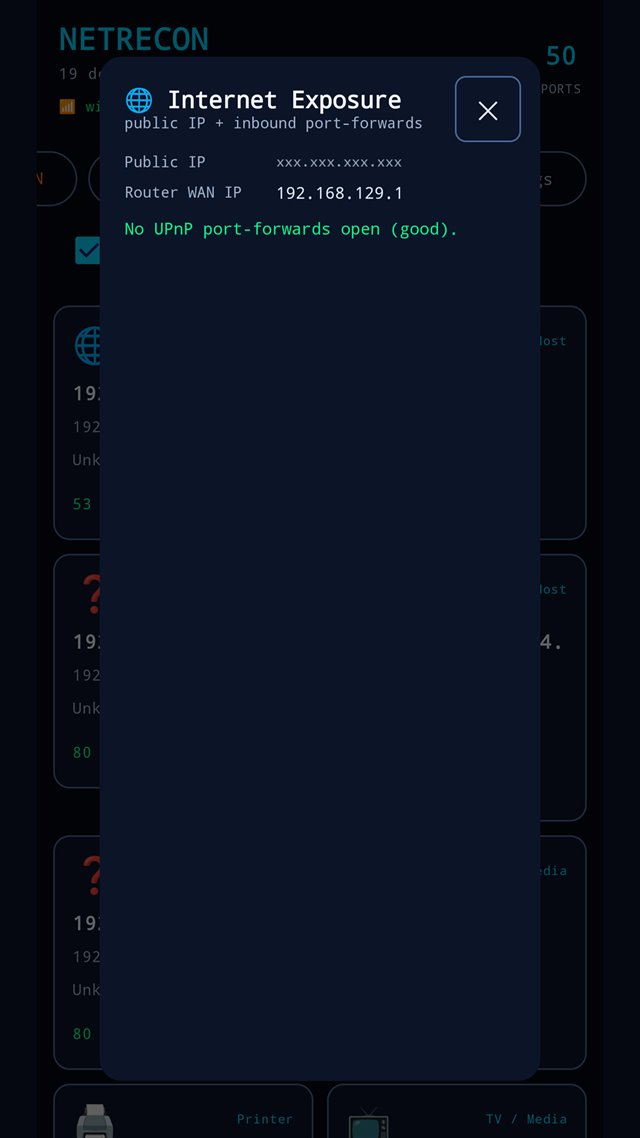
| Internet exposure checkPublic IP + router's inbound port-forwards | ✓ | ✓ |
| Wireless | ||
| Wi-Fi analyzerNearby APs: signal, channel, band, security | ✓ | ✓ |
| Wi-Fi security view | — | ✓ |
| Wi-Fi heatmap survey | — | ✓ |
| Bluetooth scanClassic + BLE | first 5 | unlimited |
| Monitoring | ||
| New-device detectionFirst-time devices flagged NEW against a remembered baseline | ✓ | ✓ |
| Background monitor & new-device alerts | ✓ | ✓ |
| Last scan restored on launch | ✓ | ✓ |
| Dashboard, casting & reporting | ||
| Live dashboard served by the phone | ✓ | ✓ |
| Cast the dashboard to a TVGoogle Cast | ✓ | ✓ |
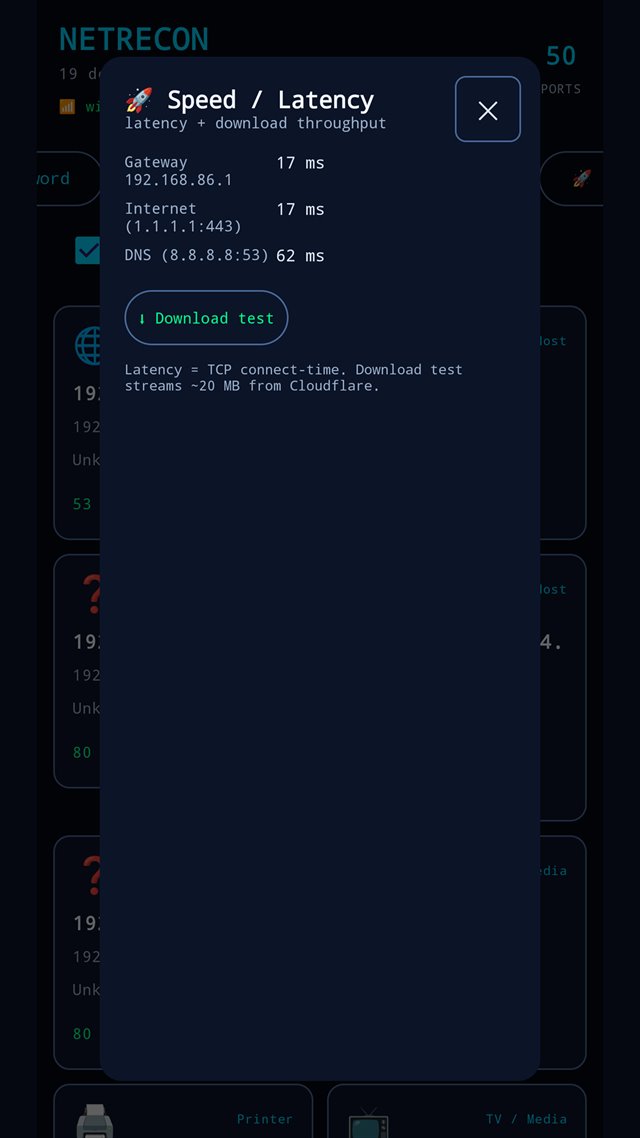
| Speed & latency test | ✓ | ✓ |
| HTML report export | — | ✓ |
| Open a device's web UI, FTP or SSHSessions into a discovered device | — | ✓ |
| The app itself | ||
| AdsAd-supported on the free tier; consent is asked for first in the EU/EEA and UK | yes | none |
| Light & dark themes, rows or tiles | ✓ | ✓ |
Pro is a single €11.99 purchase that unlocks the app on your account — there is no subscription, no login, and no server of ours involved. €11.99 is the Belgian price; other store regions show their own converted figure, and the same one-time product will carry the same price on both platforms. The table above is the Android app's split — iOS draws the same free-versus-Pro line, over the smaller feature set set out under Availability. The free tier is supported by ads; in the EU/EEA and UK your ad-consent choice is requested through a Google-certified consent platform before any ad loads, and you can reopen those privacy options from Settings at any time.
NetRecon is a mobile network scanner. The Android app is out. The iOS app is in App Store review, and it is a smaller app than the Android one — deliberately, because parts of what NetRecon does on Android are not things an iOS app is allowed to do. We'd rather spell that out than promise a date.
The full app, built with Jetpack Compose: scanning, fingerprinting, the security audit, Wi-Fi and Bluetooth scanning, the background monitor, report export, and the dashboard your phone serves to the TV.
AvailableSubmitted, and not available yet. Version 1.0 is in App Store review — it is not on the App Store and there is no beta. It discovers, audits, monitors in the background and exports a report; it has no Wi-Fi tools, no Bluetooth scan, no internet-exposure panel, no TLS audit, and no MAC address or vendor name for anything it finds. Some of those are missing because an iOS app simply cannot do them. The breakdown below says which is which, feature by feature.
In App Store review — not yet availableThe iOS build exists and is in App Store review, so these rows describe a real binary — but not one you can install yet. They separate three different things: what is in the iOS app, what we have not written yet, and what Apple's sandbox rules out no matter how much work we do.
| Capability | Android | iOS |
|---|---|---|
| Discovery | ||
| Finding the devices on the subnet | ✓Ping sweep plus a full TCP-connect sweep of the subnet, the ARP table, and mDNS. | ✓ In the iOS buildA TCP-connect sweep of the subnet the phone is actually attached to — the range is read from the routing table rather than assumed to be a /24, and is capped at /22 — alongside Bonjour discovery. There is no ping sweep: iOS gives apps no raw ICMP. Devices are listed in ascending IP order. |
| MAC addresses from the ARP table | ✓ | ✕ Not possibleiOS exposes no ARP table and no raw sockets to apps. This one is permanent. |
| Vendor lookup from the MAC prefix | ✓ | ✕ Not possibleVendor identification is derived from the MAC prefix, and the MAC comes from the ARP table iOS does not expose. No MAC, no vendor — the same platform limit as the row above, not something left unbuilt. Devices whose names or service advertisements don't identify them stay "unknown vendor". |
| mDNS / Bonjour names and services | ✓ | ✓ In the iOS buildBuilt on Apple's own Bonjour browser. Two iOS conditions apply: every service type has to be declared inside the app up front, and the first local-network access raises a system permission prompt. |
| Port scan, service banners, device categorisation | ✓ | ✓ In the iOS buildOpen ports, banners and advertised names per device, sorted into categories — router/gateway, phone, computer, printer, TV/media, speaker, smart-home, IoT, server and host. |
| SSDP / UPnP discovery | ✓ | ◑ Not in 1.0Apple has granted the multicast entitlement the app would need, but nothing in the iOS code sends an SSDP search yet. |
| SNMP and NetBIOS queries | ✓ | ◑ Not in 1.0Not part of the iOS discovery path. |
| Full fingerprint actionEvery probe at once, with evidence and confidence | ✓ | ◑ Not in 1.0Not ported. It is also only as good as the probes underneath it, several of which are unported or unavailable on iOS. |
| Custom device names & notes | ✓ | ◑ Not in 1.0The storage layer carries labels, but the iOS app has no screen for editing them. |
| Topology map | ✓ | ◑ Not in 1.0Not built on iOS. |
| Auditing & hardening | ||
| Offline security auditPlaintext and legacy services, MQTT, raw printing, open AirPlay, reachable gateway admin, cloud IoT, banner-based CVE matching | ✓ | ✓ In the iOS buildDerived from scan data alone and shared between the platforms, so the findings, the critical-to-info ranking and the fix attached to each one are the same. Pro. |
| Trust-zone / segmentation analysis | ✓ | ✓ In the iOS buildFlags a flat network where IoT and media gear shares the LAN with personal hosts, as a finding in the security audit. There is no separate trust-zone view as on Android. Shared code, no platform APIs involved. |
| Opt-in default-credential probeThe one non-passive check — off by default on both platforms | ✓ | ✓ In the iOS buildMakes real HTTP-Basic login attempts, and carries the same rules on iOS: opt-in, off until you turn it on in Settings, capped at 3 attempts per host, and it refuses to send credentials over TLS it could not verify. Pro. |
| Live probesChecks run on request against the devices found | ✓ | ✓ In the iOS buildRun from the audit screen: an unauthenticated check of Sony BRAVIA TV control APIs, plus the opt-in default-credential probe when it is switched on. Pro. |
| TLS weakness auditServices still accepting TLS 1.0 / 1.1 | ✓ | ◑ Not in 1.0Android-only. Reading back which protocol version a service negotiated needs platform TLS introspection, so it is not shared code and no iOS version of it has been written. |
| Internet exposurePublic IP plus the router's inbound port-forwards | ✓ | ◑ Not in 1.0There is no exposure panel in the iOS app. It would also need the router's UPnP mapping table, which depends on the SSDP discovery above. |
| Password / breach checkHave I Been Pwned, k-anonymity | ✓ | ◑ Not in 1.0Not in the iOS build. |
| Wireless | ||
| Wi-Fi analyzerNearby access points: signal, channel, band, security | ✓ | ✕ Not possibleiOS has no public API that lists nearby access points. An app can learn the SSID of the network it is already joined to, and only with an Apple entitlement plus location permission — it can never see the neighbours. |
| Wi-Fi security view and heatmap survey | ✓ | ✕ Not possibleBoth are built on the nearby-AP list, so they fall with it. |
| Bluetooth — classic device enumeration | ✓ | ✕ Not possibleiOS offers Bluetooth to apps in the central role only. There is no API for enumerating classic Bluetooth devices the way the Android scanner does. |
| Bluetooth — BLE advertisements | ✓ | ◑ Not in 1.0Central-role scanning could cover BLE, but nothing Bluetooth is in the iOS app today. Even when it is, a BLE-only scan is a narrower feature than the Android one, not parity. |
| Monitoring | ||
| New-device detectionDevices you have not seen before, flagged against a baseline | ✓ | ✓ In the iOS buildThe first scan sets the baseline, so you are not alerted about the network you already have. Anything new after that is reported in the background alert and marked NEW in the exported report. The device list itself does not badge new devices yet, and there is no button to reset the baseline. |
| Background monitor and new-device alerts | ✓A foreground service re-scans on an interval, so Android does not silently kill it. | ✓ In the iOS buildBackground re-scans notify you when a device that has never been seen before appears. The interval is a floor rather than a schedule — iOS decides when a background task actually runs, and can delay it — and it only sweeps on a private network, so a phone that has dropped to cellular does nothing. |
| Last scan restored on launch | ✓ | ✓ In the iOS buildThe most recent scan is saved on the phone and shown again when you reopen the app, while a fresh scan runs. One scan is kept, not a history. |
| Settings persisted between runs | ✓ | ✓ In the iOS buildDeep port scan, the credential-probe toggle, port timeout, the background monitor and its interval, a manual subnet base, restore purchase and the ad privacy options. |
| Dashboard, casting & reporting | ||
| Live dashboard served by the phone | ✓ | ✓ In the iOS buildThe dashboard the TV loads is served by the phone on iOS too. |
| Casting the dashboard to a TVGoogle Cast | ✓ | ✓ In the iOS buildCast targets are discovered and the dashboard goes to the screen. Free on both platforms. |
| HTML report export | ✓ | ✓ In the iOS buildA self-contained HTML report of the scan and the audit, handed to the normal iOS share sheet. No upload, no account. Pro. |
| Speed & latency test | ✓ | ◑ Not in 1.0Not in the iOS build. Nothing about it is blocked by iOS. |
| Open a discovered device's web interface | ✓ | ◑ Not in 1.0Handing a private LAN address to the system browser is ordinary work on iOS; there is simply no entry point for it in the iOS interface. |
| Browse a device over FTP or SSH/SFTP | ✓ | ◑ Not in 1.0No FTP or SSH entry point exists in the iOS app. The SSH library behind the Android feature has no iOS counterpart, so this may stay Android-only. |
| Per-device ping and ICMP latency | ✓ | ✕ Not possibleNo raw sockets on iOS, so no ICMP. Timing a TCP connection is the only substitute and it is not offered as a feature. |
| Wake-on-LAN | ✓ | ◑ Not in 1.0Not implemented on iOS. |
| The app itself | ||
| Free / Pro split | ✓Google Play Billing, one-time purchase. | ✓ In the iOS buildThe same line, drawn by the same shared rules: the first five devices in full on the free tier, everything else behind one non-subscription purchase, restorable from Settings. |
| Ads on the free tier | ✓ | ✓ In the iOS buildThe free tier is ad-supported on iOS as well, with its own ad privacy options in Settings. |
| Permission asked before scanning | ✓The Android permissions for Wi-Fi and nearby-device scanning. | ✓ In the iOS buildiOS shows its own local-network prompt the first time the app touches the LAN, and it can be refused. |
"In the iOS build" means it is in the 1.0 binary submitted to App Store review — not that you can install it. There is no iOS release, no beta and no date, and this page will not carry one until the app is actually on the App Store. Rows marked "not in 1.0" are backlog, not refusals. Rows marked "not possible" are Apple's sandbox and will not change: no ARP table, no nearby Wi-Fi list, no classic Bluetooth, no raw ICMP. Taken together, iOS will not reach feature parity with Android, and those rows are the reason.